Welcome#
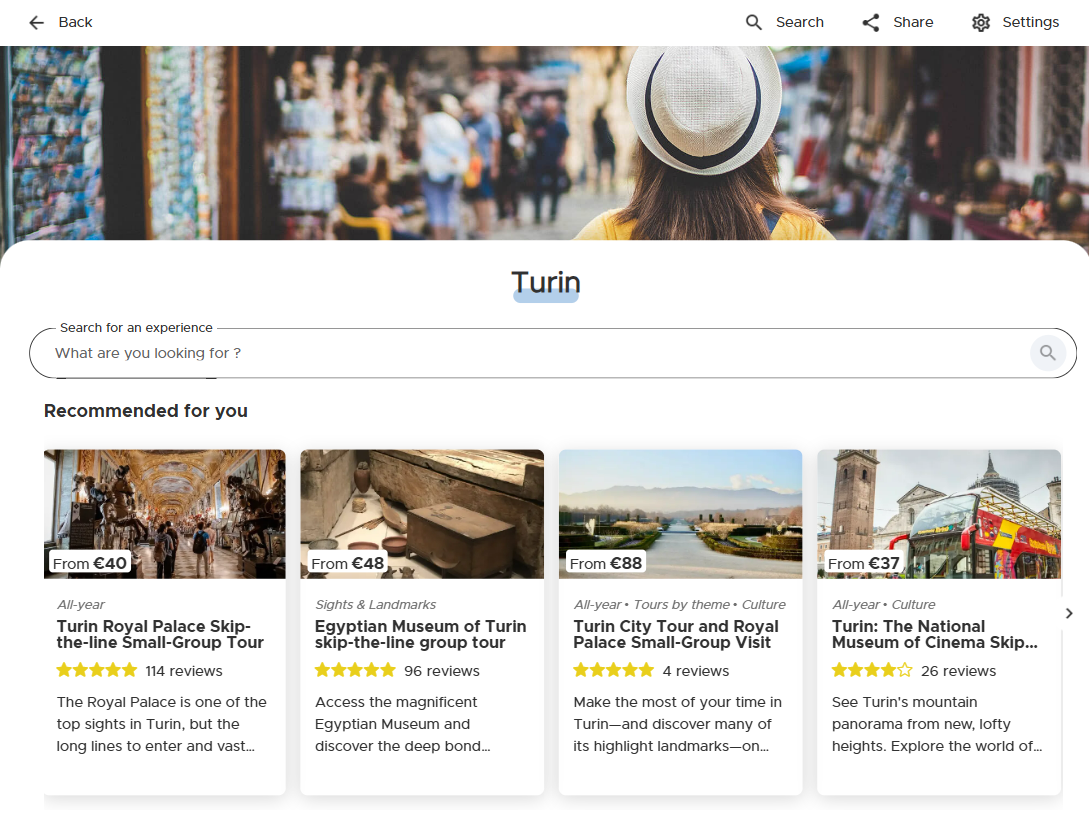
The Welcome view is the default landing page of the White Label, from here the traveler can browse multiple carousels of activities for a destination. The activities in the carousels are the result of calls to the getRecommendationProducts endpoint of the Amadeus Discover Quick Connect with different “interest” parameters, resulting in an engaging variety of offers.
Clicking on the left and right arrow or swiping (for touch devices) will allow the user to browse the carousel. Clicking on the activity card will navigate the user to the relative Activity Detail view. The search functionality above the carousels can be enabled or disabled for your channel by Amadeus Discover. It will offer a quick text-based search on top of the recommendations as additional way for the traveler to navigate the catalog. You’ll find more details in the Configuration section.
The activities inside of the carousels can be configured for you by Amadeus Discover by editing the recommendation parameters for your channel, ask Implementation Manager about it if you’re interested in it.
The channel will have a default destination, but it’s possible display activities from a different location by passing an iataCode parameter to either the URL (in standalone mode) or the traveler-widget tag (in widget mode)
Standalone Path
/v3/share/{yourChannelId}}?iataCode={iataCode} an example can be found here
Widget Config
<traveler-widget
    channel-uuid="{yourChannelId}"
    iata-code="{iataCode}"
    view="welcome">
</traveler-widget>